AI Story App for Android and What to Check First
Before you install an AI story app for Android, four things on the Play listing and the first screen tell you whether it will hold a story.
Search for an AI story app for Android and most of what comes back is a generator: you type a prompt, it hands you a finished story, and you close it. The apps you can read for an hour are a smaller category, and you can spot them before installing anything. Four things separate them — how the app handles memory, what its reading screen holds, when it tells you the price, and what it sends off your phone.
Most listings for an AI story app for Android are one-shot generators rather than apps you read across a whole evening. A language model has no memory of its own, so anything a story remembers is something the app is storing and re-sending every turn. Cloud-written fiction means the text of your story leaves the phone, and the app should say so before the first scene. A price shown once, before the story starts, reads better than a counter that ticks down while you read. Ten minutes with one specific detail, one failed action and one line of dialogue tells you more than any store listing.
Is that AI story app for Android a generator or a narrator?
Look at the screenshots first. A generator shows a prompt box, a row of genre chips, a length slider and an export button; the story is the output. A narrator shows a page of prose and one place to write what you do next; the story is the process. Both are sold with the same words, and the screenshots give them away in about five seconds. The same screenshots also show whether the app can be read at all, which is a question of line length, type size and margins on a phone.
There is a third kind worth knowing, because it is often the best writing on the shelf. Authored interactive fiction is written ahead of time in a tool like ink, inkle’s scripting language for writing interactive narrative, and the branches are designed by a human. Nothing is generated, so the sentences are edited and the endings are deliberate. What you give up is the move nobody anticipated.
Generated fiction trades the other way. Every sentence is written on the spot, so you can attempt the thing that no author planned for, and the prose is uneven where an edited script would not be. Neither form wins in the abstract. Deciding which one you want is the cheapest filter available, and it costs nothing to apply from the listing.
What can you check before you install?
More than most people bother with. An Android listing carries screenshots, an in-app purchases label, a data safety summary and a last-updated date, and each one answers a question you would otherwise discover an hour in.
| Listing signal | What it tells you | Warning sign |
|---|---|---|
| Screenshots | Whether the app is a prompt box or a reading page | Chat bubbles, stat bars, a wall of buttons |
| In-app purchases | That there is a meter of some kind | No indication of what a unit buys |
| Data safety summary | What the app collects and shares | Silence about the text you write |
| Description | Whether memory is a feature or a tier | “Improved memory” sold as an upgrade |
| Last updated | Whether anyone is still working on it | Years of nothing |
The description deserves a slow read. Apps that gate continuity behind a plan tend to say so in the pricing copy rather than the feature list, and the phrasing is usually softer than the reality: extended memory, longer context, premium recall. That is a story that forgets on the cheap plan, which is a different product from the one in the screenshots.
Does it remember what you did fifty scenes ago?
Not by default, and this is the failure that ruins the most evenings. A language model does not carry memory between turns; it reads whatever is put in front of it and writes the next passage. Anthropic’s documentation on context windows describes the window as working memory and notes that as token count grows, accuracy and recall degrade, “a phenomenon known as context rot.”
So an app that simply pastes the whole transcript back each turn gets worse as the story gets better. The fix is structural: keep the facts, characters, places and promises in a record outside the model, and hand that record to the narrator on every turn. Whether a product does that is visible from the reader’s side, because an app keeping a record can usually show it to you.
Phones make this matter more than desktops do. You read an Android app in ten-minute pieces on a bus, at a table, before sleep, which means the gap between scene twelve and scene thirteen is often a day. An app whose continuity depends on an unbroken session will not survive how you actually read. We wrote about why memory should never be a paid feature for the same reason: a story that forgets is not a cheaper story.
The twenty-minute memory test
Mention one specific, checkable detail early — a debt to a named person, a scar, a door you refused to open. Play elsewhere for twenty minutes. Then refer to it sideways, without naming it, and see whether the narrator knows what you mean. Apps that pass this once tend to pass it at scene sixty. Apps that fail it fail early.
Does your text leave the phone, and does the app say so?
If scenes are written by a large cloud model, yes: the text of your story is sent to that provider. This is worth stating plainly because the alternative genuinely exists on Android. Google’s own AI Edge Gallery runs models on device and says “All model inferences happen directly on your device hardware. No internet is required” — but the models small enough to run on a phone are not the models writing long, coherent fiction.
So for now the honest position is a cloud model plus a clear disclosure. What that looks like on screen is a sentence before the first scene, not a checkbox in settings, and a way to withdraw later without losing what you have written. Once the text does leave, the questions worth asking are about AI story app privacy after the send — how long each party keeps a copy, and whether deletion reaches the memory record as well as the prose.
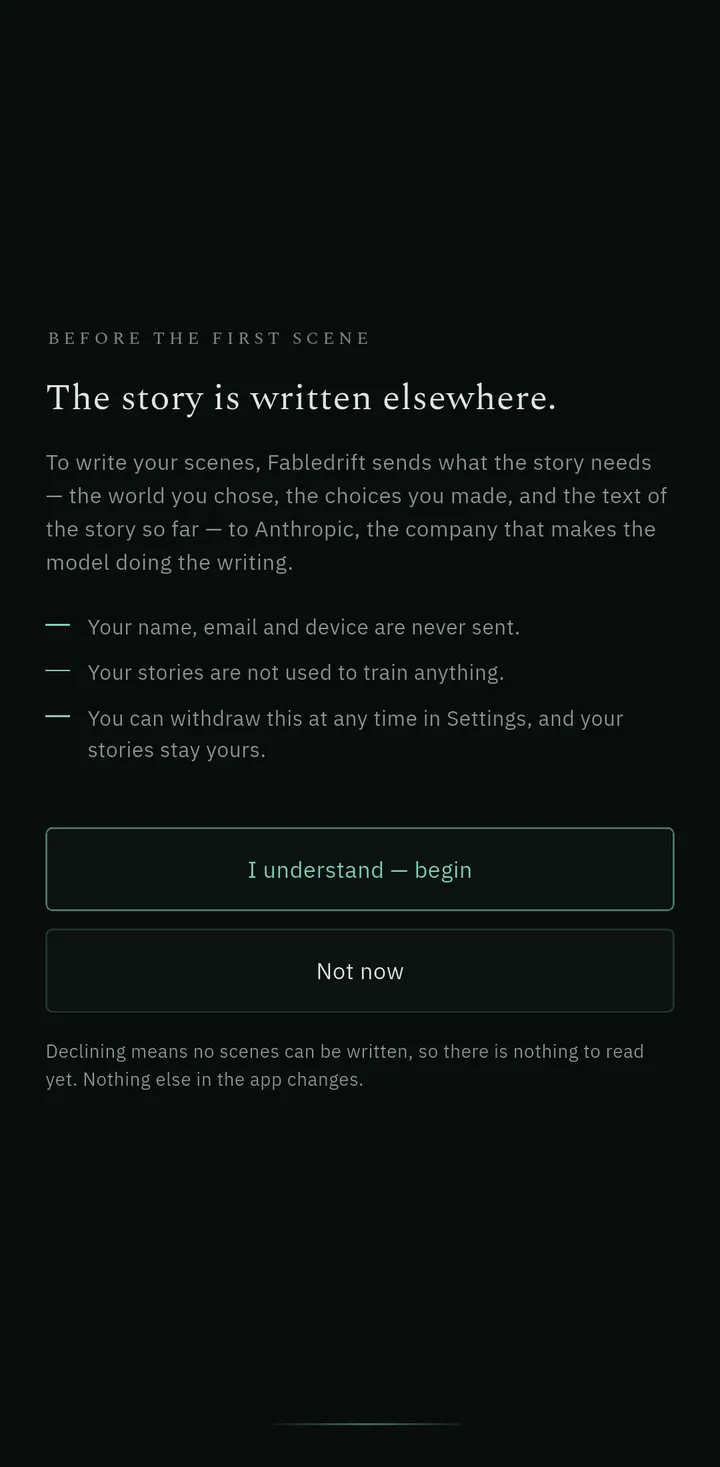
Fabledrift, an interactive fiction app for Android, asks that question once, before the first scene, and names the provider in the same sentence. Declining leaves the rest of the app intact; there is simply nothing to read yet, because there is no scene without a model to write it.
What does it cost, and when does it tell you?
The pricing question that matters is not the number but the timing. Generated fiction has a real per-scene cost, so any app doing it either subsidizes you, meters you, or subscribes you. What separates a readable app from a stressful one is whether the meter is visible while you read.
Fabledrift shows cost once, before a story begins, and never again on the page. There is no counter while you read; the balance lives in the library and profile. Reading with the Apprentice narrator is free every day. The Chronicler costs 3 credits a scene and the Oracle 5, and both are listed on the pricing page with the subscription allowances and credit packs.
Two smaller things are worth checking anywhere, because they decide how freely you experiment. Stepping back to your own earlier scene should be free, always. Retrying a scene should be free at least sometimes — in our case free on the Apprentice, once a day on the other two — because an app that charges for every second attempt teaches you to accept the first one.
A ten-minute test on the phone in your hand
Install one and refuse to be agreeable with it. Say something in dialogue and see whether it comes back in quotes. Attempt something you will probably fail and see whether the failure becomes an event or an error message. Write a move nobody suggested and see whether the app takes it or nudges you back to its own options. Then close the app for a day and reopen it, which is the test a phone actually applies.
If you are weighing this against rolling dice and keeping notes yourself, our comparison of a solo RPG and an AI story app covers who does which part of the work. Either way, the thing to watch for is the moment you stop evaluating the software and start wanting the next paragraph.
Frequently asked questions
What is the difference between an AI story generator and an AI story app you read?
A generator takes a prompt and returns a finished story in one pass; you read it once and export it. A reading app writes one scene at a time and waits for your next move, so the story is built across an hour rather than delivered in a second.
Do AI story apps for Android work offline?
Almost never for new scenes. Apps that use a large cloud model need a connection for every turn, because the scene is written on a server. On-device models exist on Android and run without a network, but they are far smaller than the models behind most story apps.
How can I tell if an AI story app really remembers my choices?
Introduce one checkable detail early, such as a promise to a named character, then play elsewhere for twenty minutes and refer to it obliquely. An app that keeps a story record outside the model will know it; an app relying on raw conversation history usually will not.
Is my text sent to a company when I use an AI story app?
If scenes are generated in the cloud, yes, the text of your story goes to the model provider. A good app tells you that before the first scene and lets you withdraw consent later, rather than burying it in a policy page.
Are AI story apps free on Android?
Some have a free tier and charge for longer or richer output. Fabledrift lets you read with the Apprentice narrator free every day and shows the cost of a narrator once, before a story starts, rather than during it.